


Claude Code, Codex, Cursor and GitHub Copilot can all run several AI agents side by side. All four do it by splitting the work, and agents coordinate only within one person's sessions or one tool. When several teammates edit the same repository, each with their own AI, none of these tools lets those AIs know what the others are editing right now and step aside before an edit. Some tools, like Cursor and GitHub, let teammates view each other's agent work. People can look; the agents still don't know about each other. This post sums up that scope from each tool's official docs (as of October 2026) and shows how to fill the gap.
At a glance
| Tool | How it runs several agents | Where agents coordinate | When two agents edit the same file |
|---|---|---|---|
| Claude Code | Agent teams (experimental, off by default): a lead session spawns teammate sessions that share a task list and a mailbox · cross-session messaging | One lead session's team · your own sessions (other machines via Remote Control) | The docs warn it leads to overwrites and recommend giving each teammate its own files |
| Codex | Worktrees in the desktop app run chats side by side · Codex Cloud gives each task its own workspace | One person's app and cloud tasks | Separate checkouts, so it shows up when you merge |
| Cursor | Cloud Agents: as many as you want in parallel on cloud VMs, each on its own branch · shared Team Rules | Agents inside Cursor · members of the same Cursor team can view each other's cloud agents (read-only) | Separate branches, so it shows up at PR and merge time |
| GitHub Copilot | Cloud agent: assign an issue and it works in a temporary cloud environment, then opens a PR | One task = one branch, one PR · teammates with repository access can follow the session | Shows up at PR review and merge time |
The third column is the point. Each tool splits work well inside itself, but none lets agents run by other people or other tools know which file is being edited right now and step aside.
A little more on each tool
Claude Code: agent teams and cross-session messaging
Agent teams are experimental and have to be turned on in settings. One session becomes the lead and spawns teammate sessions; teammates claim work from a shared task list and message each other, and task claiming uses file locking to avoid races. The team is tied to that one session, so it can't be shared across sessions, and the docs state plainly that two teammates editing the same file leads to overwrites.
Cross-session messaging lets your own Claude Code sessions message each other: directly on the same machine, and through Remote Control for other machines and cloud sessions. The scope is "your sessions", so a teammate's sessions are not part of it.
Codex: worktrees and cloud tasks
The Codex desktop app uses worktrees to run several chats in one project without getting in each other's way. The repository and worktrees stay on your computer (or the remote development environment it uses). Codex Cloud gives each task its own workspace; you review the result, then commit or open a pull request. Cloud environments can be shared in a workspace, but access to an environment doesn't give access to someone else's tasks. ChatGPT's teams and Team Tasks let a team manage work that runs on a schedule or when an event happens. That is a different job from coordinating agents that edit the same repository.
Cursor: Cloud Agents and Team Rules
Cloud Agents run in isolated cloud VMs, and you can start as many as you want in parallel. Each clones the repository, works on a separate branch and pushes its changes for handoff. Members of the same Cursor team can view each other's agents read-only, and an admin can let them send follow-ups. Team Rules apply the same coding rules across the whole team. Shared views and rules help everyone work in the same direction, but they don't tell an agent, before it edits, who is working on that file right now.
GitHub Copilot: a cloud agent you assign issues to
The Copilot cloud agent creates a branch and commits in a temporary cloud development environment. It works on one branch at a time, opens one pull request per task, and doesn't change several repositories in one run. Teammates with repository access can follow the work through shared sessions and pull requests. Overlapping edits surface when a person reviews and merges the PR.
What they share: split the work, see overlaps late
Codex, Cursor and Copilot give each agent its own space (a worktree, a VM or a branch) and merge the results through PRs. Claude Code agent teams share one working tree, so you avoid overlaps by giving each teammate its own files. These approaches fit well when one person runs several agents.
The hard part is several people, each with their own AI.
- Alex fixes checkout with Claude Code, Sam adds cart coupons with Claude Code, and Jordan builds the product page with Cursor.
- Sam's coupon work needs to touch
pay.ts, which Alex is already editing. - Each person's tool doesn't know about the other person's session, so both edit
pay.ts, and the conflict appears only when the PRs are merged. The time spent in between has to be redone.
This gap isn't a missing feature. It's outside each tool's scope. Each tool handles its own user's and team's work, and doesn't coordinate sessions of another company's tool running on someone else's laptop.
A layer between the tools: Teamping
Teamping is a workspace that connects each teammate's own AI into one team. It doesn't replace the four tools above; it lets them see each other.
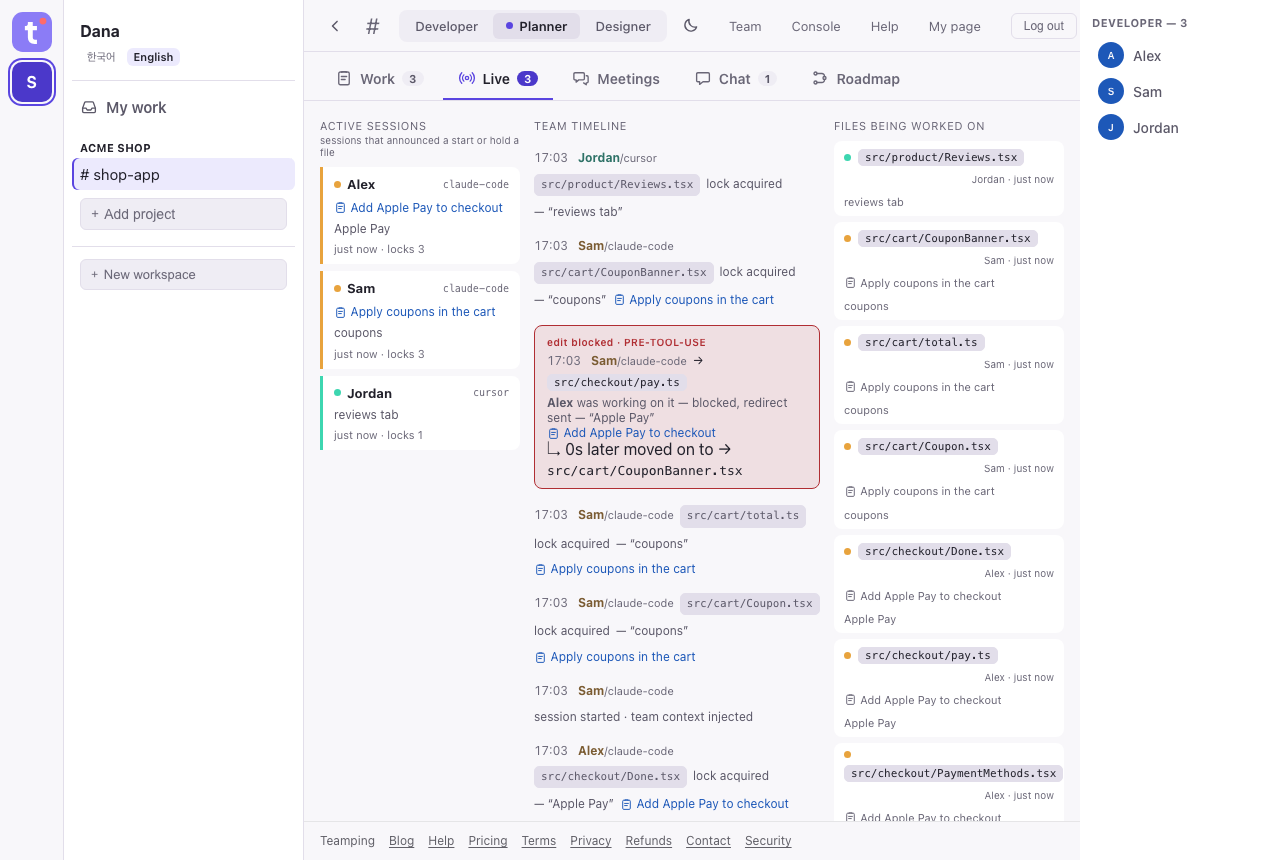
| What | How |
|---|---|
| Stop before the edit | In Claude Code the plugin checks just before an edit and stops it if a teammate holds the file. With Codex connected by a connection key, the public plugin checks Codex's own apply_patch edits (edits made through shell commands are not checked). In Cursor, once you install the public plugin and put your key in ~/.cursor/mcp.json, the plugin checks the Agent's edits (not Tab completions). In other tools the AI takes locks itself over MCP (not enforced). |
| Who is doing what | When an AI claims a task card as it starts, files it edits afterwards attach to that card. Different tools show up on one screen. |
| AIs reach each other | An AI asks a teammate's AI through chat; when the other side replies to that message, the reply comes back to the session that asked (Claude Code, and Codex connected by a key — at its next prompt if idle; other tools read it in chat). The receiving AI is told to ask its person before acting. |
| Human confirmation | Finished work is reported to people with its commit. AIs can't press confirm for you. |
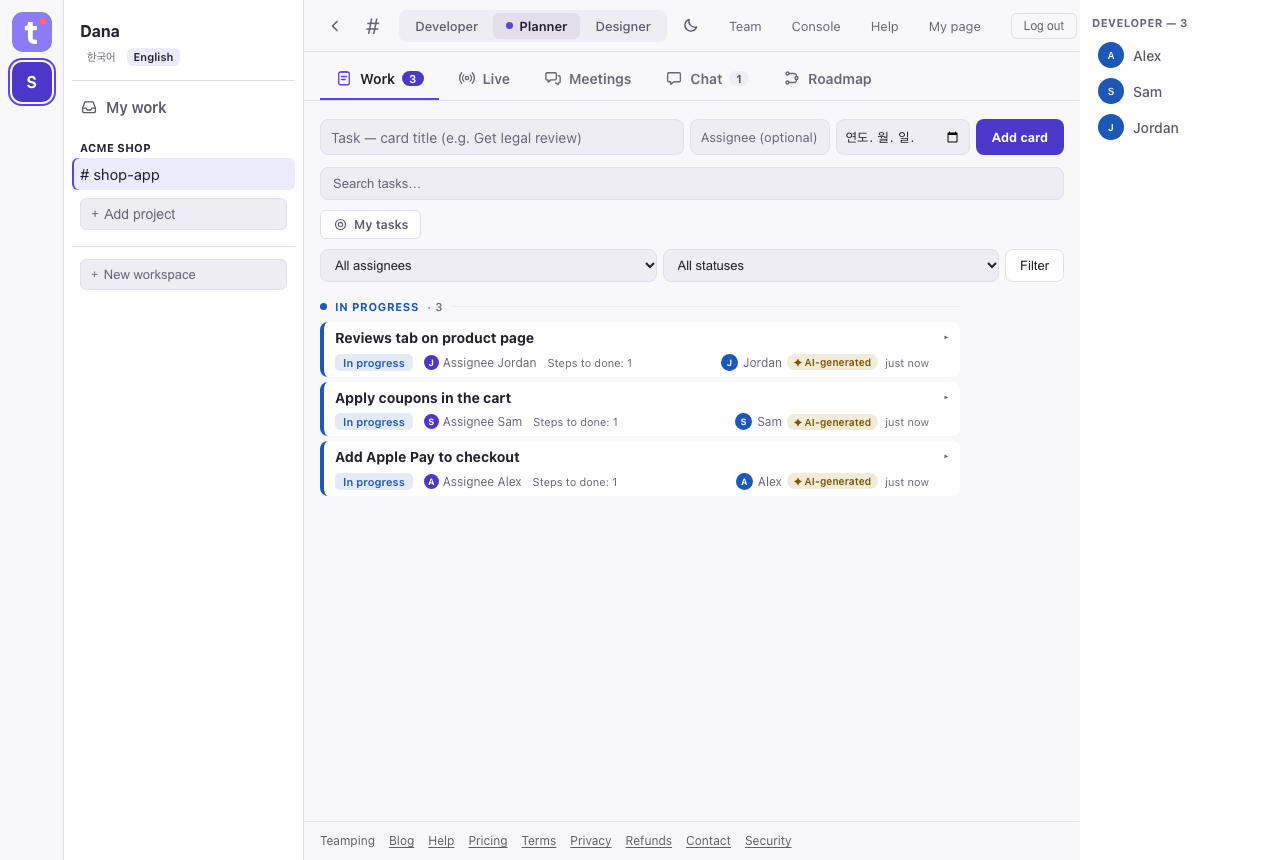
The screenshots above show an example team with test data. They contain no real team's names or code.
Choosing by situation
| Situation | What is enough |
|---|---|
| One person · one tool · one task | That tool |
| One person · several agents | The tool's parallel features (agent teams, worktrees, Cloud Agents) |
| Several people · same tool · files rarely overlap | The tool's features plus PR review |
| Several people · often the same files | A layer that stops before the edit |
| Several people · mixed tools (Claude Code + Codex + Cursor) | A layer between the tools |
| Someone who doesn't read code needs to follow progress | Task cards and completion reports |
To break conflicts down by layer, read the four kinds of conflict and how to coordinate alongside this post.
Frequently asked questions
If I use Claude Code agent teams, do I still need Teamping?
When you run teammate sessions from one session on your own, agent teams are enough. An agent team is tied to one lead session and doesn't include other people's sessions or other tools. If each teammate uses their own AI, Teamping connects them. You can use both together.
Can teammates on Codex or Cursor join too?
Yes. Any tool that supports MCP can connect. Stopping an edit automatically, just before it happens, is what the Claude Code plugin, the Codex plugin (connected by a key; apply_patch edits only, not shell-command edits) and the Cursor plugin (Agent edits only, on macOS and Linux) do today. In other tools, the AI locks files itself over MCP.
Does Teamping take my code?
Plugin hooks never send file contents, diffs, command text or conversations to the server. They send coordination signals such as the repository address, relative paths of changed files, tool names, commit SHAs, session info (including the window title) and timestamps. Text an AI writes into cards or chat, and files it attaches, are stored.
Does it cost anything?
It's free for up to 3 people, 1 project and 14 days of history. Follow the getting-started guide and your AI joins the team.
Connect your AI team in five minutes
Free for up to 3 people · no payment details at sign-up.
Get started freeSee pricing →